What is Raster Imagery?
Raster imagery consists of a grid of cells (or pixels) arranged in rows and columns. Each cell contains a value representing information, such as color, temperature, or elevation.
Common examples of raster imagery include aerial photographs, satellite and UAV (drone) imagery, digital photographs, and scanned maps.
Prequisite: This feature is not included in the base subscription and must be purchased separately.
To Upload Raster Imagery
Accepted file formats:
-
Geotiff (TIF/TIFF)
-
JPEG/PNG raster image with world file (ZIP)
Max File Size Limit: 50MB
-
From the PointMan Web interface, create or open the project to import the Raster files to
- Raster files can only be imported to a basic folder or subfolder. Create a basic folder
-
Hover over the folder to import the file to. Click the Upload button (the Cloud icon with an up arow in it) that appears to the right of the folder name
-
Under “Are you uploading a vector layer or raster layer?”, click the dropdown and select Raster
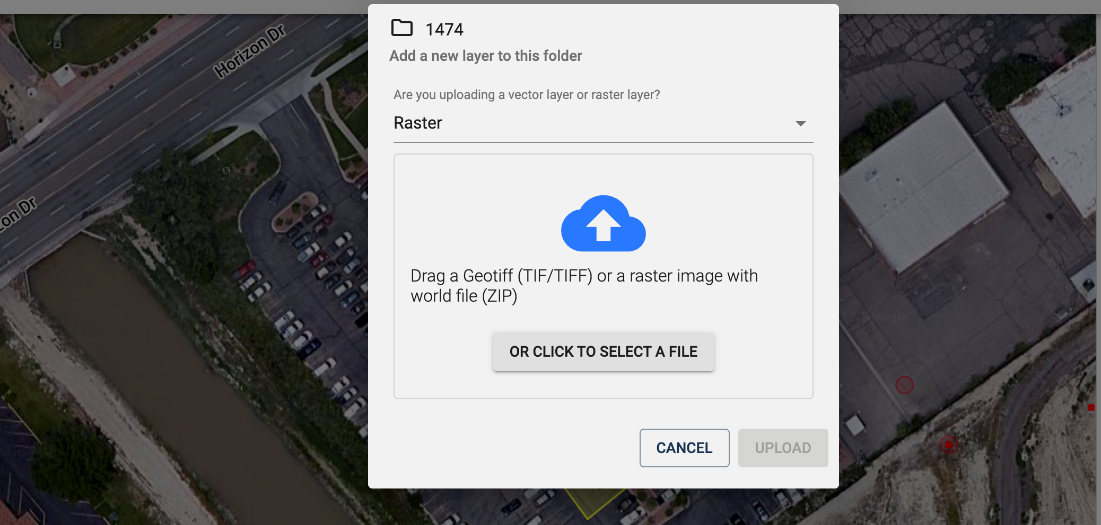
- Drag and drop your file into the upload window, or click the button to select the file
- Click Upload
- Open the Jobs panel via the Briefcase button that is next to the Search button in the top right to check the status of the import request

- Use the Refresh button in the top right of the Jobs panel to check the updated status. Once you see "Success", refresh the browser tab
- You will now see the file added as a layer under the selected folder when you view the Project panel. Check the box to enable the layer for viewing
For Questions or Issues
Contact the PointMan Support Team by completing the Support Request form or send an email to support@pointman.com and include the following:
- Question / Brief description of what you are experiencing
- Include screenshots / screen recordings showcasing the issue if any
- Include supporting data files showcasing the issue if any
- The Raster file you are attempting to import
- List of steps that were already taken to troubleshoot the issue
The PointMan Support Team is available from 8:30am to 4:30pm MT, Monday through Friday.