In addition to attaching files at the placemark feature level, files may now also be attached to any vertex within an existing line or polygon. Attachments at the vertex level will have the vertex number listed on the file. When Shot Numbers are enabled, the file will list the shot number instead of the vertex number.
-
Log in to the PointMan Pro project
-
Attachments can be added both during live data collection and after the line or polygon has been collected.
-
To add attachments as the data is being collected, tap New and Select the appropriate line or polygon
-
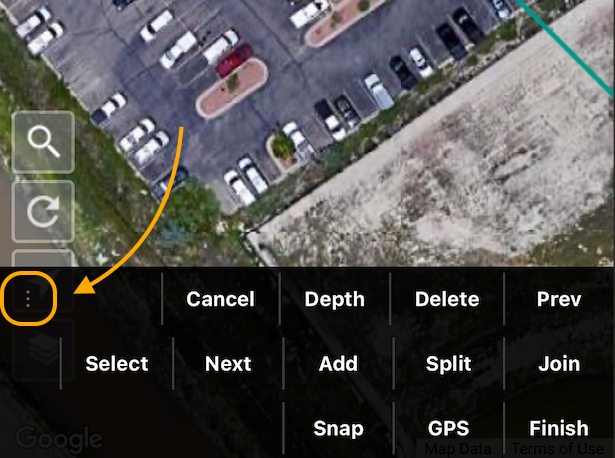
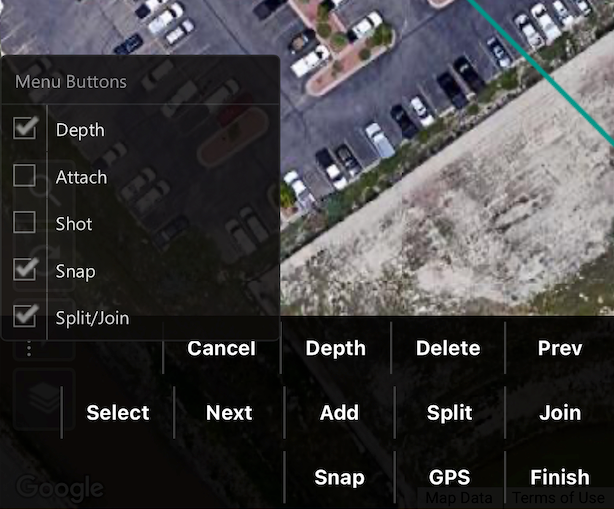
Tap the 3 dots on the left side of the collection menu bar to open view/enable the additional Menu Buttons
-
-
Check the box for “Attach” to enable it and tap anywhere on the screen to close the menu. An “Attach” button will appear in the menu bar
-
Tap Attach to open the Attachments dialogue
-
Tap Attach again and select the appropriate file type
-
You may either attach additional files, delete attached files, or tap Close to continue
-
Collect your next vertex and repeat this step as many times as needed
-
-
Tap Finish to save the placemark and its attachments
-
To add additional files to the existing line, select the placemark and tap Move
-
Use Prev and Next to navigate to the desired vertex
-
Tap Attach to open the Attachments dialogue
-
Tap Attach again and select the appropriate file type
-
Tap Close to save and repeat this step as many times as needed then tap Finish to save the placemark changes
-
-
To view all files attached to a line or polygon, select the placemark and tap Details. All attached files will be listed with its associating vertex after the file link
-
You can tap Edit to delete any existing files directly from this view
-
These attachments are exportable and viewable from the Cloud environment as well